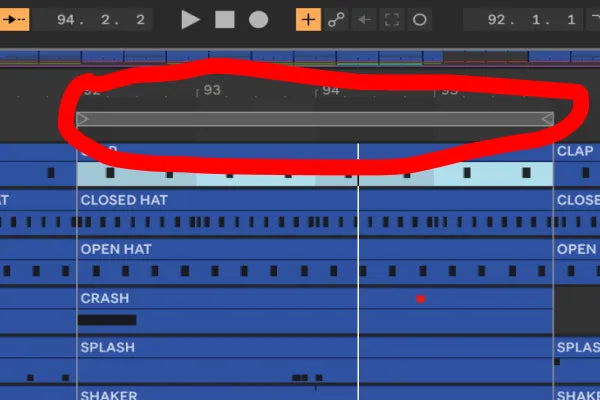
There is a category of problem in music production that is almost invisible because it is so small. Not the big creative blocks, the tiny mechanical frictions you have stopped noticing because you do them so often. Dragging the loop brace in Ableton to go round a section is one of them. You want to loop this clip, so you grab the loop bar, drag it to the start, drag the end to match, hit play. Then you move to the next section and do it all again. And again. Hundreds of times a session.
None of those moments is a big deal on its own. Added up across a writing session, they are a steady tax on your attention, and worse, every one of them is a tiny interruption between you and the music. After enough years of producing, I have come to believe these small frictions matter more than the big ones, because they happen constantly and they pull you out of flow every single time.
Why looping is where you actually live
If you write the way most people write, you spend most of a session inside a loop. You loop four bars while you get the groove right. You loop the breakdown while you layer it. You loop the transition while you make it work. Looping is not an occasional action, it is the default state of writing electronic music: round and round a section, making small changes, listening, changing again.
Which means the act of setting the loop is one of the things you do more than almost anything else in the program. And Ableton, for all it gets right, makes you do it by hand, dragging a bar to the right place every time you want to focus somewhere new.
What LoopScope does
LoopScope removes the drag. You click on a clip, and the loop sets itself around that clip. That is the whole idea, and the smallness of the description is the point. Faster navigation around your set, and auto-looping of whatever you are working on, without reaching for the loop brace at all.

Put like that it sounds almost too minor to bother with. But think about how many times you set a loop in a four-hour session, then imagine each of those being a single click instead of a grab-and-drag-and-adjust. The time saved is real, but the bigger win is the one you cannot measure: you stay inside the music. You think "I want to hear that part," you click, and you are hearing it, with no mechanical detour in between.
The kind of tool this is
I will be honest about what LoopScope is and is not. It is not going to change your sound. It does not touch your audio. It is a workflow tool, plainly and simply, a fix for something you wish Ableton just did, the same way the reverbs we built are fixes for the rack you wish you did not have to rebuild every time.
That is a whole category of what we make: spot a small repeated action that breaks your concentration, and remove it. None of these tools is impressive in a demo. They are impressive at hour three of a session, when the friction you used to absorb just is not there anymore.
How it changes a session
The shift is subtle and then permanent. Once setting a loop is a single click, you start jumping around your arrangement more freely, because the cost of moving your focus has dropped to almost nothing. You audition sections you would not have bothered to before. You rehearse a transition by clicking between the two parts instead of fiddling with the loop bar twice. Editing and arranging both get a little more fluid, and that fluidity adds up over a track.
Where the device fits
LoopScope is a Max for Live device for Ableton Live that sets the loop around a clip the moment you click it, for faster navigation and auto-looping while you write. It is a small tool that solves a small problem you do a hundred times a day, which is exactly why it earns its place.