LoopScope Max for Live MIDI Device for Ableton 12

Max For Live Midi Device

Sale price£8.00 GBP
Music production software interface with tracks and loops. Promotional image for LoopScope, a Max for Live Midi Device from Producerstack.com

LoopScope Max for Live MIDI Device for Ableton 12

LoopScope is the complete, professional grade solution for clip based navigation and arrangement control in Ableton Live.

How many times have you stopped mid flow to manually drag the loop brace, lost your creative momentum hunting through clips, or forgotten which section you were supposed to be working on? Loop Scope eliminates these workflow interruptions by responding intelligently to your creative decisions. The moment you select a clip, your session reconfigures itself around that choice loop boundaries set, playback ready, progress visualised. It's the difference between wrestling with your DAW and having it anticipate your next move.

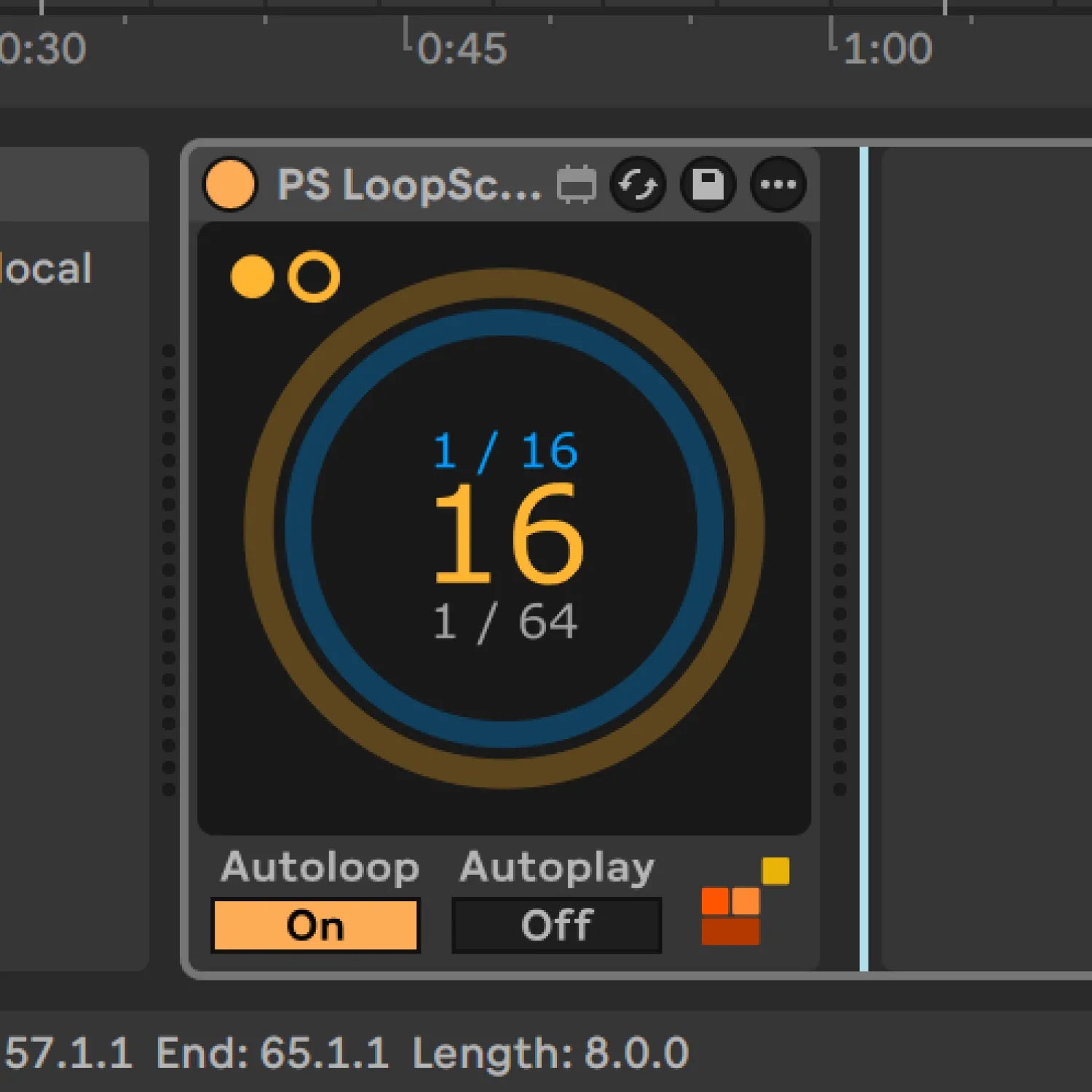
LoopScope harnesses Max's live.observer module to monitor your clip selection in real-time, instantly updating loop boundaries and playback position without manual intervention. The dual-ring visualiser shows both your overall loop progress and current bar position simultaneously, whilst the centre display counts down remaining bars giving you constant spatial awareness in your arrangement. Autoloop snaps the loop brace to your selected clip's boundaries and activates looping. Autoplay triggers playback from the clip start point. Because the device only responds to clips on its own track, you can deploy multiple instances across your project for section specific control, or use a dedicated arrangement track with dummy clips for global navigation.

You're getting professional grade navigation built specifically for producers who value creative flow over technical friction a complete solution that removes arrangement tedium so you can focus on making music.

Intelligent Clip Detection with Seamless Ableton Integration

LoopScope integrates natively within Ableton's environment using Max's trusted object architecture. The device appears alongside your native instruments and effects, responds instantly to clip selection without latency, and handles automation mapping like any built-in Live device. This native integration means stable performance, predictable behaviour, and seamless saving with your project, no third-party plugin bridges or compatibility concerns.

Automatic Loop Configuration and Real Time Visual Progress

LoopScope delivers instant loop brace positioning and real-time visual feedback through Max's live.observer detection system. Select any clip on the device's track and watch your loop boundaries automatically conform to its length whilst dual-ring displays track both overall progress and bar level position, eliminating manual adjustments and keeping you oriented within complex arrangements.

Professional Quality Built on Proven Max Architecture

Loop Scope is built with Max's proven live.observer module the same object architecture that powers countless professional Max for Live devices worldwide. This foundation ensures CPU efficient performance even with multiple instances, stable operation across extended sessions, and predictable behaviour you can rely on when working to deadlines.

Multi-Instance Workflow for Complex Arrangement Control

Because LoopScope only responds to clips on its own track, you can use multiple instances simultaneously without conflicts, place one on each section track for dedicated control, or create a global arrangement track with dummy clips for overview navigation. This flexible architecture lets you build the exact workflow your production style demands, from simple single-instance setups to complex multi-section arrangements.

Professional Max for Live Design

All devices built with optimised CPU performance, bulletproof stability, and intuitive interfaces tested by working producers for reliable session performance.

Seamless Ableton Integration

Every device integrates natively into Ableton Live with full automation support, preset management, and zero plugin-bridging latency for frictionless workflow.

Clear Commercial Licensing

All Max for Live devices supplied with straightforward commercial licenses. Use in your productions with complete confidence.

Video demonstrating how LoopScope Max for Live device from ProducerStack.com works

Why This Matters

Every Max for Live device we make follows one principle:

Remove friction, don't add features.

This tool does works the way Ableton
would have done it if they'd thought of it.

No flashy graphics.
No subscription.
Just a problem solved.

Promotional image for LoopScope, a Max for Live Midi Device from Producerstack.com

Intuitive Two-Control Interface for Streamlined Navigation

The control surface presents just two essential toggles, Autoloop and Autoplay, alongside the visual progress display. This minimal interface philosophy means you spend zero time learning the device and maximum time using it. Autoloop activates the loop brace and snaps it to your selected clip's boundaries. Autoplay triggers playback from the clip's start point.

The dual-ring visualiser updates in real-time as your arrangement plays, with the outer orange ring tracking overall loop completion whilst the inner blue ring shows bar-level progress. The centre numerical display counts down remaining bars, and metronome dots alternate with the beat for instant rhythmic reference. These visual cues give you constant awareness of your position without breaking focus from your creative work.

Music production software interface with timeline and control panel on a gray background. Promotional image for LoopScope, a Max for Live Midi Device from Producerstack.com

Auto Loop Brace

Select a clip to automatically set the loop brace and visualise playback progress. The device only responds to clips on its own track, so you can use multiple instances across your project or use a global "arrange" track with dummy clips.

Visualiser

  • Outer ring (orange): Loop progress
  • Inner ring (blue): Current bar progress
  • Centre number: Bars remaining
  • Metronome dots: Alternating beat indicator

Controls

Autoloop: Sets loop brace to clip boundaries
Autoplay: Starts playback from clip start

Promotional image showing the signal flow design for LoopScope, a Max for Live Midi Device from Producerstack.com

Intelligent Signal Flow and Safe LiveAPI Integration

Under the hood, LoopScope uses JavaScript validation to ensure accurate clip data reading across varied project structures, from simple eight-bar loops to complex arrangement sections spanning dozens of bars. The v8 scripting engine validates each clip selection before passing data through the system, preventing errors and maintaining reliability regardless of your project's complexity or unconventional arrangement structures.

Product FAQs

Promotional image showing the Ableton Interface for LoopScope, a Max for Live Midi Device from Producerstack.com

Technical Specifications & Package Contents

SYSTEM REQUIREMENTS:

  • Ableton Live Version: 12.0.5 or higher
  • Max for Live Version: 9.0.9
  • Operating System: macOS 10.13+ / Windows 10+
  • CPU: Modern multi-core processor recommended for multiple instances
  • RAM: 4GB minimum, 8GB recommended

TECHNICAL FOUNDATION:

  • Powered by Max's live.observer module for real-time Live object monitoring and instant clip detection response
  • Uses deferlow routing for safe LiveAPI writes, ensuring stable operation during live performance and complex automation scenarios
  • JavaScript (v8) validation engine ensures accurate clip data reading across varied project structures
  • Optimised signal flow delivers sub-millisecond response to clip selection changes

LOOP SCOPE - COMPLETE PROFESSIONAL TOOL:

Here's what's happening under the hood:

Select a clip on this track to automatically set the loop brace and visualise playback progress. The device only responds to clips on its own track, so you can use multiple instances across your project.

SIGNAL FLOW:
live.observer detects clip selection → v8 script validates and reads clip data → outputs routed through deferlow for safe LiveAPI writes → visualisation updates in real-time

PACKAGE CONTENTS:

  • Max for Live Device File (.amxd)


Email support: support@producerstack.com