
Auto-Set Your Loop Brace | LoopScope for Ableton Live

Max For Live Midi Device

Every time you switch sections in an Ableton session, you stop to drag the loop brace. It’s a small interruption, but it happens constantly — and it’s the exact moment your creative momentum stalls.

LoopScope monitors your clip selection in real time using Max’s live.observer module, automatically snapping the loop brace to the selected clip’s boundaries the instant you click it. No dragging, no menu diving, no losing your place. Select a clip, the loop brace follows.

Sale price£8.00 GBP

Professional Max for Live Design

All devices built with optimised CPU performance, bulletproof stability, and intuitive interfaces tested by working producers for reliable session performance.

Seamless Ableton Integration

Every device integrates natively into Ableton Live with full automation support, preset management, and zero plugin-bridging latency for frictionless workflow.

Clear Commercial Licensing

All Max for Live devices supplied with straightforward commercial licenses. Use in your productions with complete confidence.

Promotional image for LoopScope, a Max for Live Midi Device from Producerstack.com

What LoopScope Does

LoopScope watches your clip selection in real time using Max’s live.observer module, the same detection architecture that powers professional Max for Live devices worldwide.

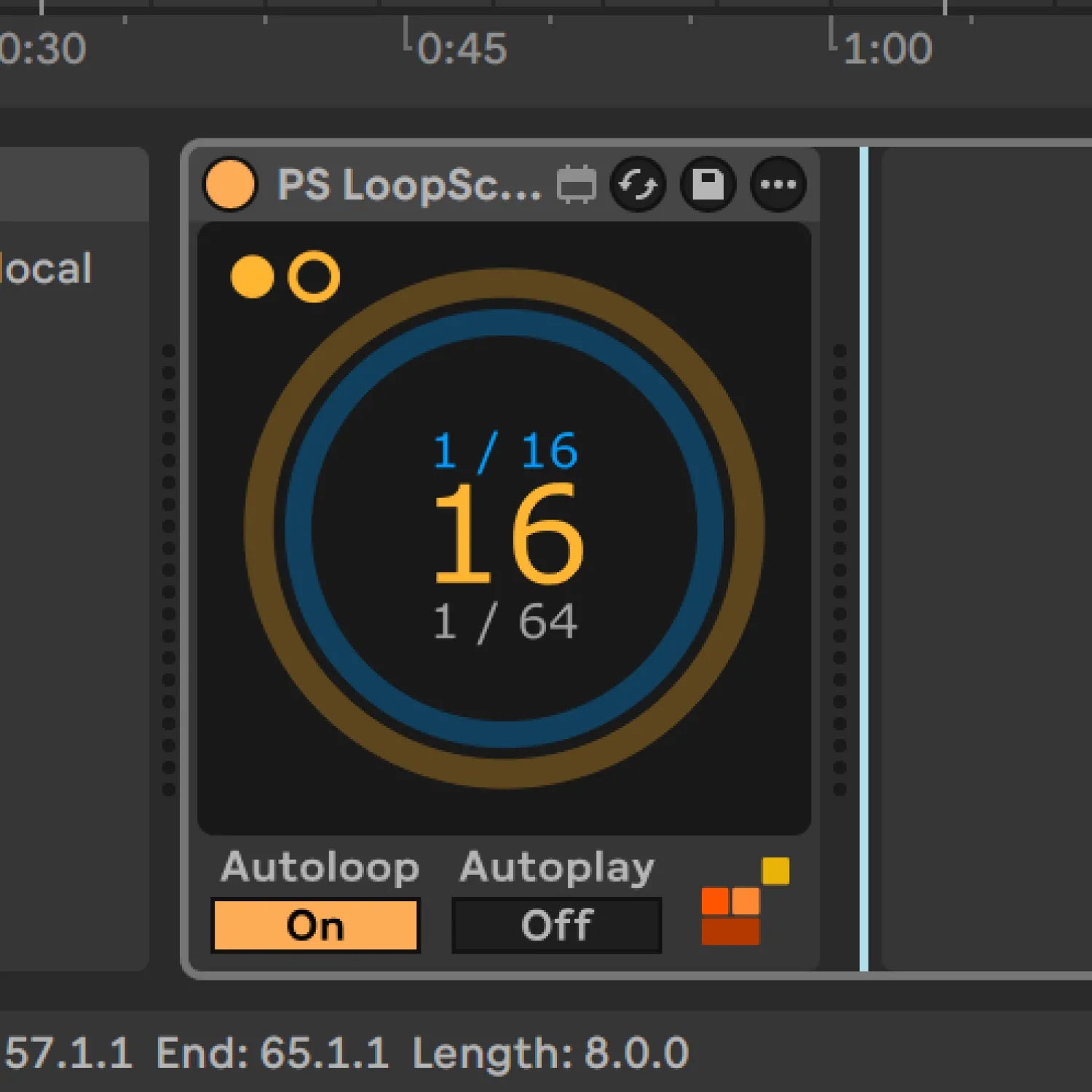
The moment you select a clip on the device’s track, the loop brace snaps to that clip’s start and end points, looping activates automatically, and playback triggers from the clip’s beginning if Autoplay is enabled. The dual-ring visual display shows your position simultaneously at two levels: the outer ring tracks overall loop progress, the inner ring shows bar-level position, and the centre display counts down remaining bars.

Because LoopScope only responds to clips on its own track, you can run multiple instances across a project without conflicts, one per section track for dedicated control, or a global arrangement track with dummy clips for full-session navigation.

All LiveAPI writes route through deferlow for stable operation during live performance, and a JavaScript v8 validation engine ensures accurate clip data reading regardless of your project’s structure.

Why This Matters

Every Max for Live device we make follows one principle:

Remove friction, don't add features.

This tool works the way Ableton would have done it if they'd thought of it.

No flashy graphics.
No subscription.
Just a problem solved.

LoopScope signal flow: [live.observer](http://live.observer) clip detection → v8 validation → deferlow → loop brace update

LoopScope — Use Cases

  • Navigating between arrangement sections during a writing session without touching the loop brace — select the drop clip, the loop brace follows; select the break clip, it follows again, instantly
  • Live performance use where you’re triggering clips and need real-time visual confirmation of where you are in the bar without losing focus on your performance
  • Building a dedicated arrangement track with dummy clips labelled by section (Intro / Build / Drop / Break / Outro) and using LoopScope on that track as a session navigation controller
  • Rehearsing or A/B testing specific sections by clicking clips in sequence, with the loop brace repositioning automatically between each listen
  • Running multiple instances simultaneously — one on the drum section track, one on the melodic section track, for independent section-level loop control across a complex project

Music production software interface with timeline and control panel on a gray background. Promotional image for LoopScope, a Max for Live Midi Device from Producerstack.com

Auto Loop Brace

Select a clip to automatically set the loop brace and visualise playback progress. The device only responds to clips on its own track, so you can use multiple instances across your project or use a global "arrange" track with dummy clips.

Visualiser

  • Outer ring (orange): Loop progress
  • Inner ring (blue): Current bar progress
  • Centre number: Bars remaining
  • Metronome dots: Alternating beat indicator

Controls

Autoloop: Sets loop brace to clip boundaries
Autoplay: Starts playback from clip start

PS LoopScope: Max for Live device that auto-sets the loop brace on clip selection in Ableton Live

Compatibility, Ableton Live & Max for Live

  • Max for Live 9.0.9
  • macOS 10.13 or higher / Windows 10 or higher
  • Multi-instance compatible, each instance responds only to clips on its own track, no conflicts

Ableton Live 12.0.5 or higher (Suite, or Standard with Max for Live purchased separately)

LoopScope | Frequently Asked Questions